VaCuus
Your game's interface in HTML and CSS, rendered entirely off the game thread.
You author screens as .rml / .rcss documents — the web languages, not a UMG graph — and the plugin runs them on its own UI thread: layout, styling and draw-command recording all happen away from the game thread, which only enqueues input and reads back a snapshot. Full-screen HUD, menu, or a panel on a quad in the world.
- Unreal Engine 5.6 – 5.8primary
- Unityin development
- Godotin development
- Windows
- macOS
- Linux
- Android
- iOS
- Consoleson request
Off the game thread, measured
docs/perf-guideOne UI thread owns every document: layout, styling and draw-command recording. The render thread replays the resulting command buffer into a persistent render target, and Slate composites that target every engine frame. What is left on the game thread is enqueueing input and reading one published snapshot.
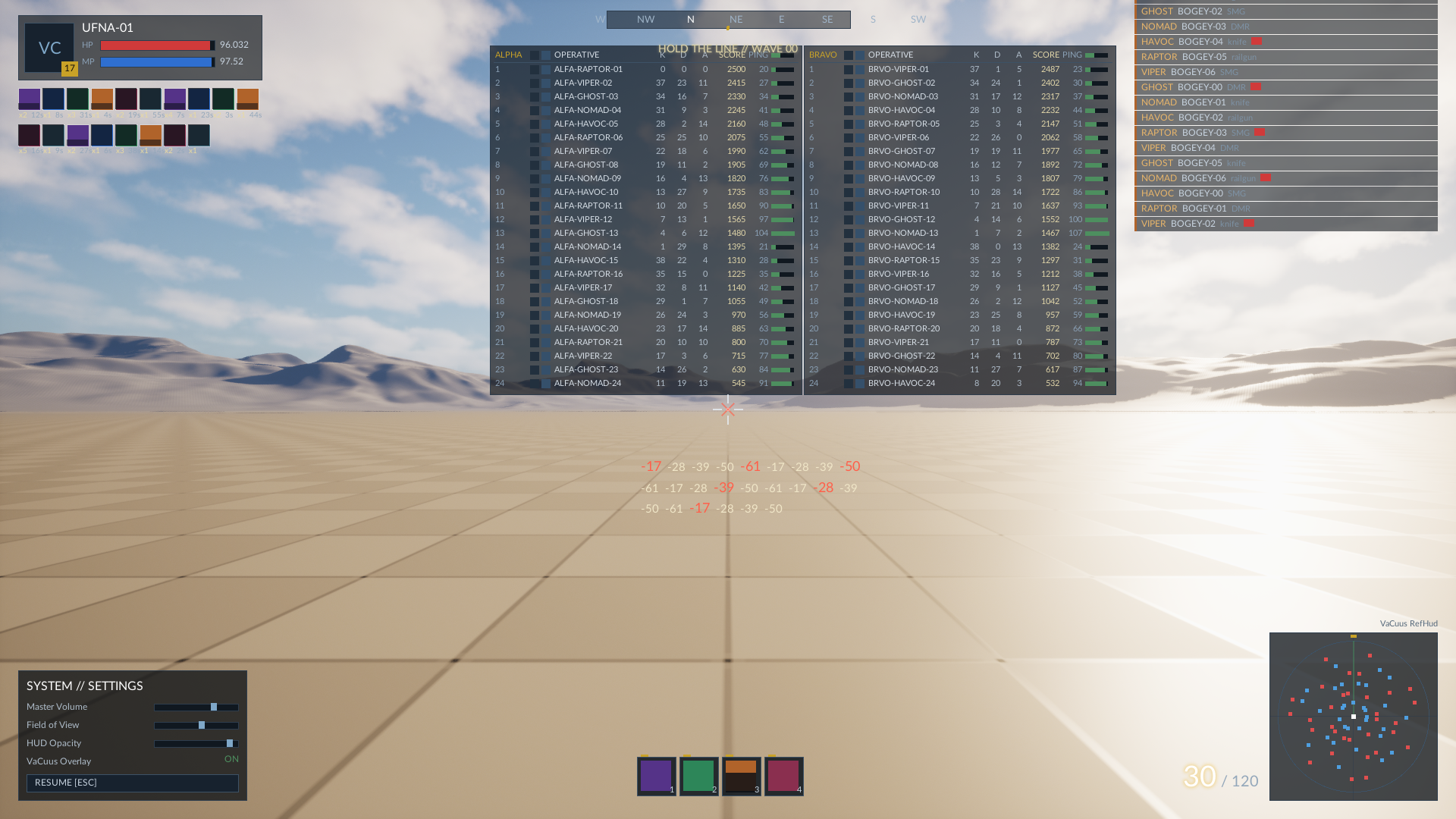
Publication is withheld when a frame's content hash is unchanged and no resource traffic occurred, so a static UI stops costing anything to draw: the static M1 HUD published 1 frame in 6,910, and the glass demo 0 of 3,363. The reference HUD below publishes 100% of frames by design — it animates every one of them, which is why it is the worst case.
Every figure here is measured and re-runnable in your own project: vacuus.RefHud to load the scene, vacuus.M1HUD.PerfLog 1 to print the timings and the publish ratio.
| Game thread / frame budget 0.10 ms · ~8–11× | 0.012 ms dev 0.008–0.009 ms shipping |
|---|---|
| Composite only, idle UI budget 0.05 ms · ~12–25× | 0.002 ms shipping 0.003 ms dev |
| UI thread, update + record budget 1.2 ms steady avg | 1.050 ms shipping 1.077 ms dev |
| Added RAM budget 32 MB · A/B median | +14.3 MB |
| Added disk, shipping budget 10 MB · Linux proxy | +3.22 MiB |
Plain text, live reload
docs/setup.rml is the markup, .rcss the styles, and both are plain files on disk. There is no editor asset to open and no graph to wire — your edit is complete when the file is saved, and it diffs, reviews and merges like the rest of your source.
Screens live under Content/DevUI: the plugin's own tree ships the demos, and your project's tree is an extension point beside it, not an override.
- Save the file. Any editor. No import step, no reimport prompt, no asset registry entry.
- The watcher reloads the document in place while PIE keeps running — the editor watches
Content/DevUI. - At runtime,
vacuus.ReloadUIdoes the same thing from the console. - No recompile. C++ is what hosts the document; it is not what the document is made of.
Built for AI agents
docs/ai-guideThe entire UI surface is text an agent can read and write. That is the easy half. The hard half is that most authoring mistakes here produce no error and a screen that renders — just not the one you asked for. A human notices immediately; an agent, which cannot see the screen, does not.
So the package ships the other half too: a front door the agent finds on its own, a generated ground truth to check itself against, and a verification loop that works without eyes.
UI is VaCuus (HTML/CSS off the game thread). Before touching anything under
Content/DevUI, read Plugins/VaCuus/docs/buyer/ai-guide.md and
Plugins/VaCuus/docs/buyer/rcss-matrix.md.
AGENTS.md
At the package root, where an agent looks first. Short by design: the five things that would otherwise cost the session, and links to the real pages.
ai-guide.md
The full brief. Which mistakes warn, which are drawn wrong in silence, and how to tell the two apart.
rcss-matrix.md
99 properties, 20 shorthands, 16 decorators — parsed out of the exact RmlUi vendored in the package, not out of a model's training data. If a property is not in that file, it does not exist.
The verification loop
A declaration RmlUi cannot parse logs a warning naming file:line, in every configuration including Shipping. Plus a headless 1920×1080 render recipe and the 279-test suite, so an agent can check its own work.
Engine-native data
docs/setup Data models bind straight from your UPROPERTY fields. The plugin reads them through the engine's own reflection — no mirror struct to keep in sync, no serialisation step between your game state and the document.
JavaScript is optional, not assumed. QuickJS-ng is vendored in-tree for the projects that want scripting, and a TypeScript/Preact workflow sits on top of it when you want that too.
- UVaCuusWidget — "VaCuus View" in the UMG palette. Screen space: HUD, menu, overlay. Drop it into any UMG tree and point it at a document.
- UVaCuusWorldComponent — "VaCuus World Panel". A pixel panel on a quad in the world.
- Both work from Blueprint and from C++. Either one hands you a view, and the view is what you feed and drive.
Rendered by the plugin
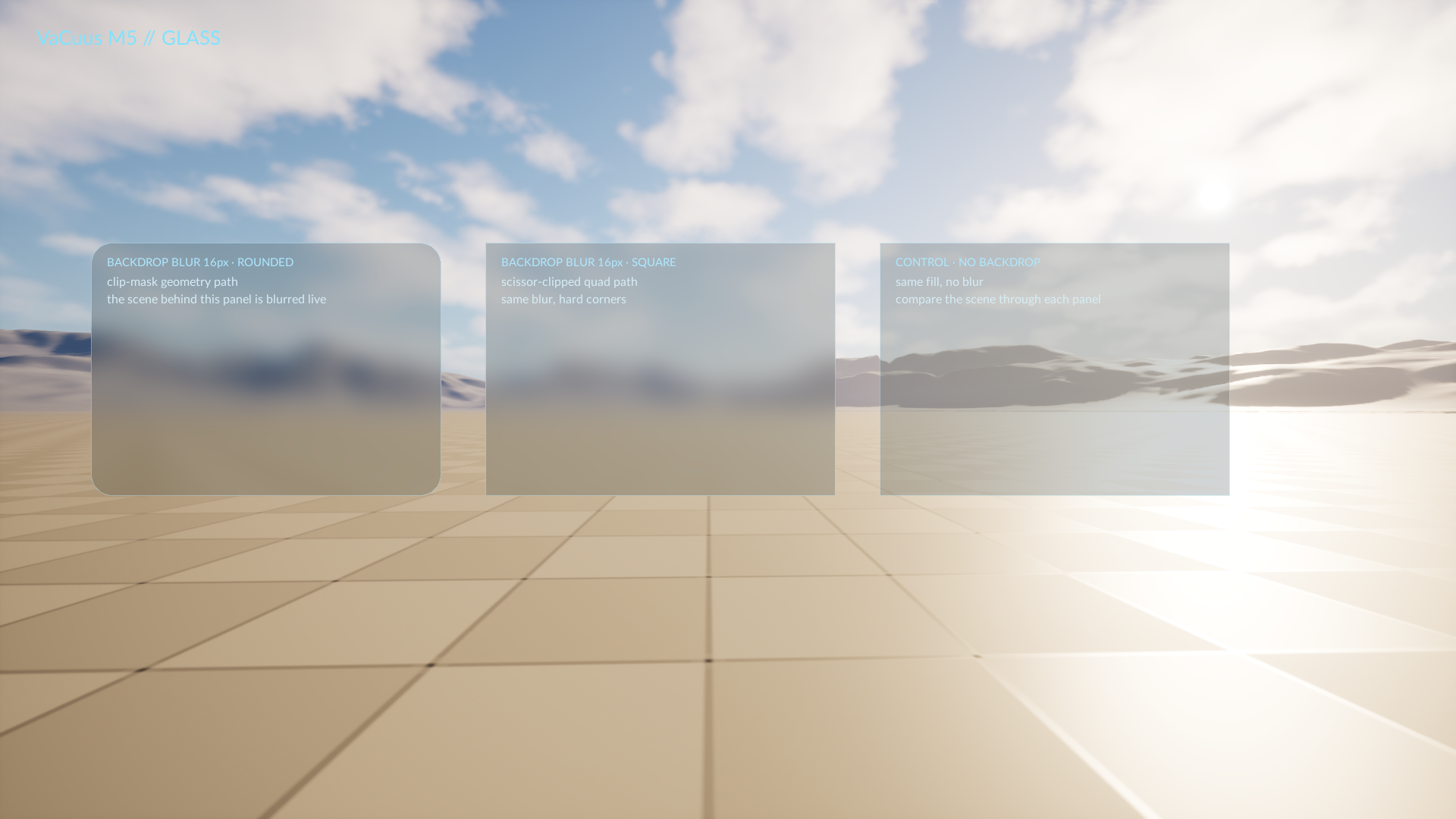
headless, 1920×1080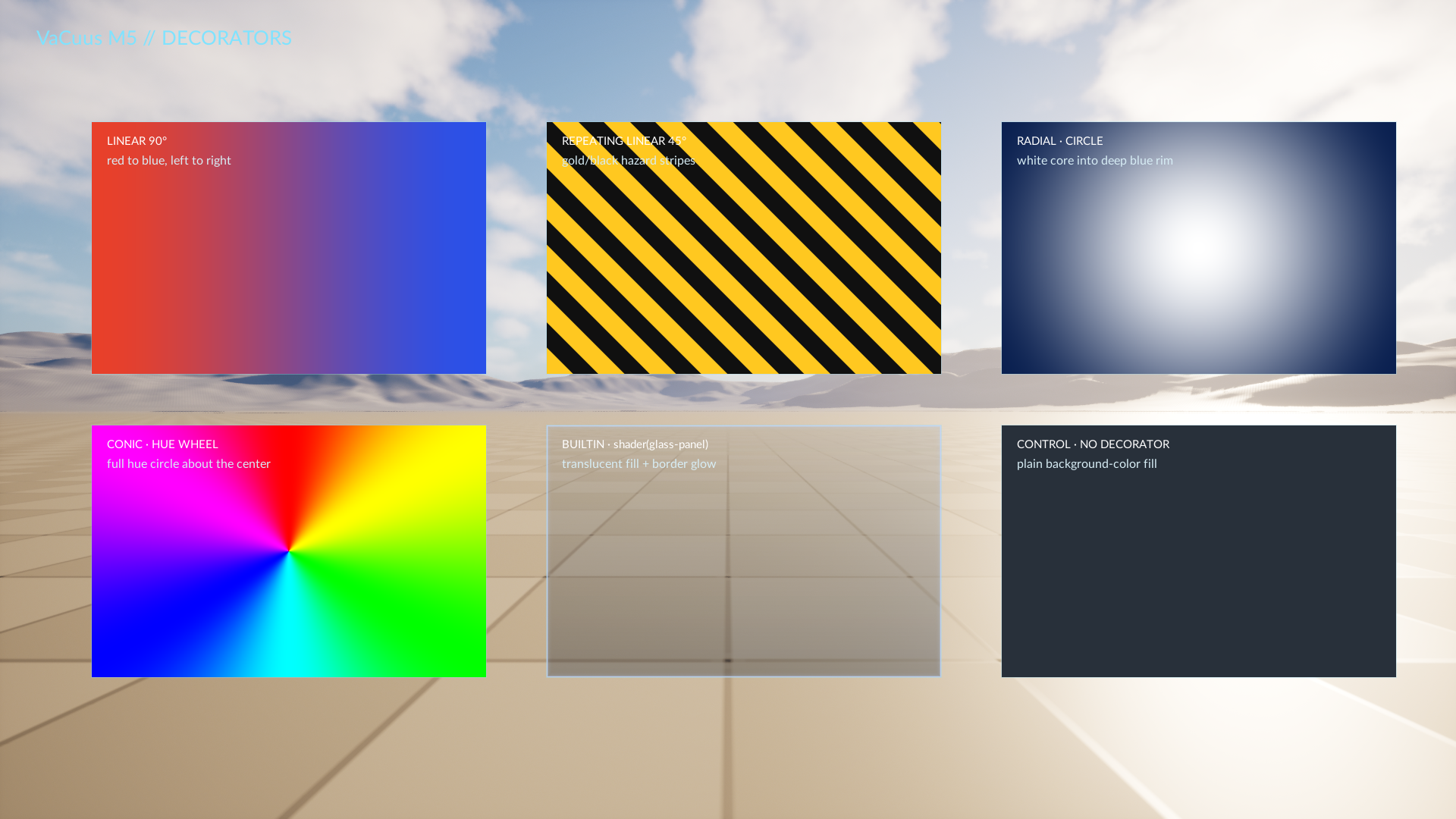
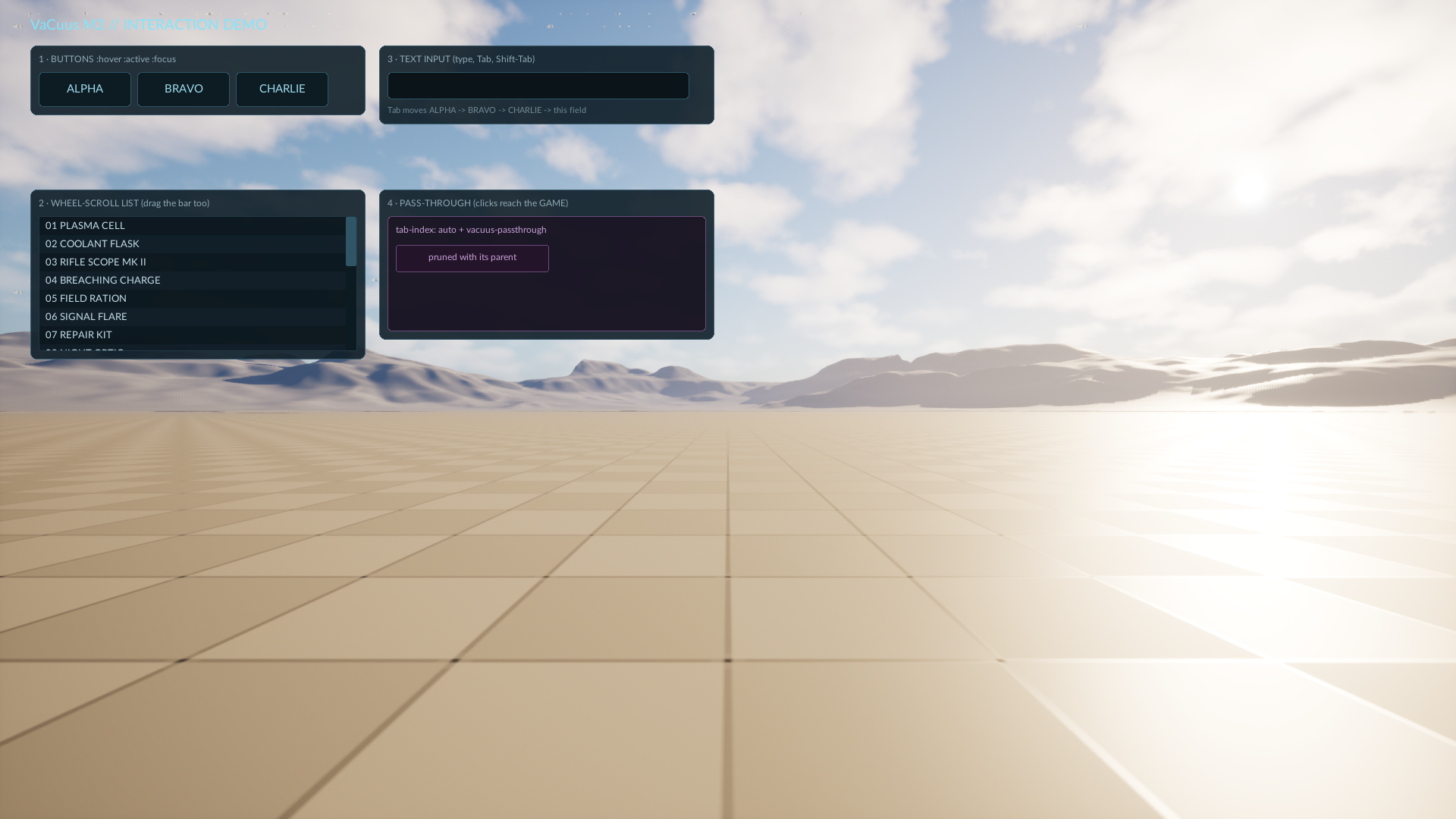
:hover/:active/:focus, a wheel-scroll list, a text field with tab order, and a region that lets clicks reach the gameWhy not a browser?
middleware research · 2026-07Every other web-UI plugin for Unreal on Fab is a Chromium wrapper — CEF under one name or another — so this is the comparison that decides the purchase. Here is what a browser costs inside a game, beside what this costs, with both columns measured.
A browser in your game
| Added to the build | 330–390 MB shipped payload |
|---|---|
| Runtime RAM | 150–300+ MB |
| Processes | 4–5 separate, plus their IPC |
| Input path | +1–2 frames across the process boundary |
| Game thread | pumps the browser's message loop CefDoMessageLoopWork |
| Upkeep | a two-week Chromium security cycle |
| HTML/CSS core on disk | 256 MB Chrome-class, stripped |
And in UE specifically: the message-loop pump above was found in Epic's own integration, and accelerated off-screen rendering on Linux/NVIDIA is broken.
VaCuus, measured
| Added to the build | +3.22 MiB Linux Shipping proxy |
|---|---|
| Runtime RAM | +14.3 MB A/B median |
| Processes | 0 extra in-process, one UI thread |
| Input path | answered in-process from the frame's snapshot |
| Game thread | 0.012 ms / frame enqueue input, read snapshot |
| Upkeep | no Chromium in your build |
| HTML/CSS core on disk | 3.8 MB the vendored RmlUi library |
Disk, RAM and game-thread rows are the plugin's own budget table, re-runnable in your project: vacuus.RefHud then vacuus.M1HUD.PerfLog 1. The game-thread figure is the dev build; cooked Shipping measures 0.008–0.009 ms.
The part you need survives the cut
Dropping the browser is not dropping motion. RCSS has transitions and @keyframes, decorators — linear, repeating, radial and conic gradients, plus a built-in shader — backdrop blur over the live 3D scene, and updates driven straight from your UPROPERTY fields, all inside a deterministic in-process core.
The screenshots directly above this section are not mockups and not a competitor's demo reel: they are this pipeline rendering itself, headless, at 1920×1080.
A bounded surface is the AI feature
An agent can only build a UI it can hold in its head. The supported language here is small, closed and generated — 99 properties, 20 shorthands, 16 decorators, parsed out of the exact RmlUi vendored in your package — so the whole surface fits in an agent's context as ground truth. A mistake surfaces as a log warning naming file:line, in every configuration including Shipping, instead of a devtools session nobody is sitting in front of; a screen verifies with one headless render.
That is why an agent can build flashy, animated UI here: the surface is bounded and instrumented. Against a full browser it is guessing across the whole web platform, and it cannot see the screen it guessed wrong on.
How that works →What it is not
docs/rcss-matrixNot a browser engine
No <a href> navigation, no CSS Grid, no fetch, no DOM library you remember. Navigation is the host calling LoadDocument; layout is flexbox and absolute positioning.
RCSS is not CSS
It is RmlUi's style language: a deliberate subset with its own additions. The generated matrix is the exact difference, keyed to the engine in your package — read it before you write a property.
Not every property is drawn
A few parse and are then not rendered — box-shadow is the headline case, and it warns per view and names a substitute. The matrix marks them; nothing here is a surprise you find at ship time.
Not a project-folder install
A Fab install lands in the engine, with binaries Epic built — a Blueprint-only project can enable it and go. The full source ships regardless; drop it into <Project>/Plugins instead and it builds like any C++ plugin (that route does need a C++ project).
License
LICENSE.mdVaCuus is source-available under the Business Source License 1.1. In one sentence: everything is free until you ship something commercial, and a commercial release is $69.99 per project. No signup, no licence key, nothing in the plugin phones home.
Free
$0no signup, no licence key
Everything short of a commercial release, with no time limit and nothing withheld.
- Read, fork and modify the source
- Prototypes, evaluation, internal tools, game jams
- Ship a free, hobby or academic game
- Full source, all three engines, the 279-test suite
GitHub Releases — one archive per engine version, with SHA256SUMS.txt beside them.
Not a trial. It is the same plugin as the paid one, and it does not stop working.
Commercial
$69.99per project · perpetual
Needed when you ship or operate a product for commercial advantage or monetary compensation.
- One title, any team size
- Perpetual — it covers the release you ship, and every 1.x update
- Direct from the author; invoice and custom terms on request
Consoles, source escrow or purchase-order terms — ufna@ufna.dev
Nothing to activate. There is no licence key and no check in the plugin — the copy you develop with is the copy you ship.